LinkedIn Ads Targeting: How B2B Teams Reach the Right Buyers
By Adam Fischer • January 31, 2026
Why LinkedIn targeting feels confusing (and why it matters)
It’s time to launch a new LinkedIn ad campaign! You feel totally confident about LinkedIn ads targeting, right?
Erm…maybe not.
If you’re not feeling confident about LinkedIn Ads targeting, you’re not alone.
There are a bunch of settings, filters, targeting options, and measures of success to manage. It can be overwhelming to determine where to begin and what the right approach is for your business.
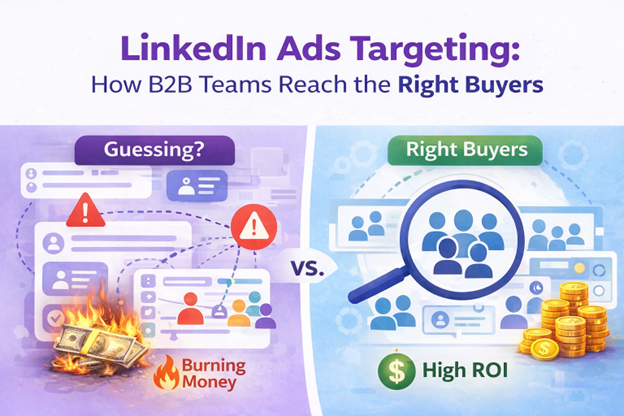
The real risk, spending money on the wrong audience
One of the biggest fears B2B marketers have about LinkedIn Ads is spending money on the wrong audience. It’s true that spending money on LinkedIn ads is a significant investment, and if done wrong you can bleed budget fast. In fact, at $8-$16 per click or more, LinkedIN ads can be 3X to 10X more expensive than Meta. You’re paying for targeting you can’t get anywhere else, but you need to master it to get high quality leads without burning your budget with the wrong audience.
Luckily, for as much bad targeting on LinkedIn Ads that wastes precious funds, there is great targeting that yields a significant return on investment.
What good targeting on LinkedIn looks like
In B2B marketing, “good targeting” on LinkedIn Ads means that you know who your target audience is, what message will resonate with them, and how to reach them.
Let’s assume that you know these first two things: who your target audience is and what message will resonate with them. But maybe you’re struggling with how to reach them. We’re here to help you figure that last part out by providing you with our proven tips and techniques for navigating LinkedIn Ads targeting.
The LinkedIn targeting options you should understand first
To effectively reach your target audience on LinkedIn, you first need to understand the targeting options available to you. At a high level, LinkedIn Ads targeting is built on three core components:
- Targeting categories
- Inclusions
- Exclusions
LinkedIn offers a wide range of targeting categories you can use to define your audience, such as company name, company size, job function, seniority, and more. These categories allow you to filter and select the characteristics that align with your
Ideal Customer Profile.
However, the most important principle to understand is this:
LinkedIn Ads targeting isn’t just about choosing who should see your ads. It’s also about actively preventing the wrong people from seeing them.
For every attribute you include, you should be asking yourself who needs to be excluded. Exclusions help tighten your audience by removing roles, companies, or attributes that don’t align with your goals, ensuring your ads aren’t served to irrelevant or unqualified users. This two-step process is what turns basic targeting into an effective strategy.
We’ll break down each targeting category in detail, and you’ll see this “inclusion-plus-exclusion” approach reinforced throughout. Once you understand how these pieces work together, you’ll be far better equipped to use LinkedIn’s targeting options to drive meaningful, efficient results.
For a full view of all of LinkedIn’s targeting options, check out this download here >.
Locations and language, common “gotchas”
LinkedIn requires you to target your audience by location. You can target by continent, county, state/region, county, and city. There are options to target by permanent location (ideal for reaching residents in a specific location), recent location (useful for advertising related to events), or a combination of both. In most cases, you’re going to want to filter by permanent location.
You can also exclude specific locations within your LinkedIn ads campaign to avoid showing ads to people for whom your service isn’t relevant. Let’s say for the sake of this blog you are trying to reach marketing agency owners in the United States. You’ll want to filter for “United States” and exclude all other countries.
LinkedIn also requires you to
target your audience by language, of which there are 35 to choose from. However, there is a common “gotcha” in the LinkedIn Campaign Manager when it comes to selecting a language that you should be aware of: for Sponsored Content, selecting “English” does not mean you are filtering your audience by language. It means your ads can reach
all members in your targeted locations, regardless of the language set on their LinkedIn profiles.
Language only becomes a true audience filter when you select a non-English language, which restricts ad delivery to members whose profile language matches that selection. The exception is Sponsored Messaging, where language selection always acts as a filter, English included.
When in doubt,
we recommend selecting the language that your ad is written in.
Company industry and company size
Let’s return to our example of trying to reach marketing agency owners in the United States.
In this case, you would filter by company industry and
include “Marketing Services” and “Advertising Services.” Then, you would
exclude every other industry that LinkedIn provides as a category. This is time consuming, but well worth it because it will narrow your audience and ensure that LinkedIn doesn’t present your ads to people in irrelevant industries.
You’d want to take the same approach to filter for
the company sizes you want. When it comes to marketing agencies, 50 employees or less is typical, so you would filter to
include
company sizes of 2-10 and 11-50. You would then
exclude all other company size options.
No matter the industry or company size you’re targeting, starting with clear inclusions and then deliberately excluding the rest is how you prevent wasted spend and maintain targeting precision.
Job function and seniority vs. job title
For most B2B marketing teams, “job function” combined with “seniority” should be the default approach. This pairing is one of the most effective ways to reach the right people without unnecessarily narrowing your audience or missing qualified prospects due to title variation. Here’s why it works so well.
Job titles on LinkedIn are far from standardized. The same role can be represented by dozens, and sometimes even hundreds, of different titles. For example, someone leading HR might be called Head of HR, VP of People, Chief People Officer, or something entirely custom. If you rely on job titles alone, you’re forced to anticipate and include every possible variation, which is time-consuming and still leaves room for error.
The job function option solves this problem. LinkedIn groups users into broader functional buckets, such as Human Resources, Marketing, Sales, Business Development, or Entrepreneurship, regardless of how their title is written. So, when you layer job function with seniority (i.e., Manager, Director, VP, CXO, Owner, Partner), you can efficiently reach everyone who fits that role and level of influence.
This approach is especially effective for targeting founders, owners, and executives, like in our example of targeting marketing agency owners in the United States. Many of these individuals don’t fit neatly into traditional job functions. Instead, they often fall under Business Development or Entrepreneurship, with seniority levels such as Owner, Partner, or CXO. Filtering by function and seniority captures these audiences far more reliably than trying to guess the “right” title.
It’s also important for you to understand a key LinkedIn Ads limitation:
you cannot target job function, seniority, and job title at the same time.
You must choose one of the following:
- Job function and seniority
or
- Job title alone
In almost all cases, job function plus seniority is the better choice, but there are exceptions. For example, we recommend targeting by job title in situations where there are few, if any, alternative ways to describe the role. For example, a title like “Chief Transformation Officer” or a newly emerging role may not yet be consistently categorized under a function. In those cases, job title targeting can be the most precise option.
There is one final and critical point we want to make here:
Even when you’re targeting for job function and seniority, you can still EXCLUDE job titles.
This is where many advertisers miss an opportunity. Excluding irrelevant or unwanted titles (such as junior roles) helps tighten your audience without sacrificing reach. Think of exclusions as guardrails that protect your budget while allowing your inclusion targeting to remain broad enough to perform.
In short:
- Use job function and seniority as your default targeting strategy
- Use job titles sparingly, and only when the role is truly niche or new
- Always apply job title exclusions to filter out noise
This approach gives you the best balance of scale, precision, and efficiency within LinkedIn Ads targeting.
Skills, interests, and groups
For most B2B marketing teams, “job function” combined with “seniority” should be the default approach. This pairing is one of the most effective ways to reach the right people without unnecessarily narrowing your audience or missing qualified prospects due to title variation. Here’s why it works so well.
Job titles on LinkedIn are far from standardized. The same role can be represented by dozens, and sometimes even hundreds, of different titles. For example, someone leading HR might be called Head of HR, VP of People, Chief People Officer, or something entirely custom. If you rely on job titles alone, you’re forced to anticipate and include every possible variation, which is time-consuming and still leaves room for error.
The job function option solves this problem. LinkedIn groups users into broader functional buckets, such as Human Resources, Marketing, Sales, Business Development, or Entrepreneurship, regardless of how their title is written. So, when you layer job function with seniority (i.e., Manager, Director, VP, CXO, Owner, Partner), you can efficiently reach everyone who fits that role and level of influence.
This approach is especially effective for targeting founders, owners, and executives, like in our example of targeting marketing agency owners in the United States. Many of these individuals don’t fit neatly into traditional job functions. Instead, they often fall under Business Development or Entrepreneurship, with seniority levels such as Owner, Partner, or CXO. Filtering by function and seniority captures these audiences far more reliably than trying to guess the “right” title.
It’s also important for you to understand a key LinkedIn Ads limitation:
you cannot target job function, seniority, and job title at the same time.
You must choose one of the following:
- Job function and seniority
or
- Job title alone
In almost all cases, job function plus seniority is the better choice, but there are exceptions. For example, we recommend targeting by job title in situations where there are few, if any, alternative ways to describe the role. For example, a title like “Chief Transformation Officer” or a newly emerging role may not yet be consistently categorized under a function. In those cases, job title targeting can be the most precise option.
There is one final and critical point we want to make here:
Even when you’re targeting for job function and seniority, you can still EXCLUDE job titles.
This is where many advertisers miss an opportunity. Excluding irrelevant or unwanted titles (such as junior roles) helps tighten your audience without sacrificing reach. Think of exclusions as guardrails that protect your budget while allowing your inclusion targeting to remain broad enough to perform.
In short:
- Use job function and seniority as your default targeting strategy
- Use job titles sparingly, and only when the role is truly niche or new
- Always apply job title exclusions to filter out noise
This approach gives you the best balance of scale, precision, and efficiency within LinkedIn Ads targeting.
Advanced Linkedin Ads Targeting: Testing Audience Combos
Although we typically see job function + seniority end up as the main winner for audience targeting, you should test some additional setups if you have the budget and time.
At a high level, LinkedIn audience targeting falls into one of these four combos:
- Job Titles
- Job Seniority + Job Function
- Job Seniority + Job Function + Skills
- Any of the above + Company Growth Rate
Understanding when, and when not, to use each combo is critical to reaching the right buyers without wasting budget.
The company growth rate feature is an interesting one. This allows you to prioritize companies that are actively scaling, hiring, or investing, often signaling higher buying intent. This targeting allows you to craft messaging to your audience that specifically addresses their problems and needs as a high growth organization.
Matched Audiences, the most underrated targeting tool
Matched Audiences are one of the greatest tools available for B2B LinkedIn ads targeting, particularly for ABM, retargeting, and expansion campaigns.
Matched Audiences, the most underrated targeting tool
LinkedIn’s Account List Targeting allows you to upload a CSV of target company names and match them against LinkedIn’s database of company pages. This essentially lets you run account-based marketing (ABM) campaigns directly within LinkedIn, reaching decision-makers at specific organizations you care about rather than broad demographic segments.
Once your list is uploaded and matched (which can take up to 48 hours), you can add it to your campaign like any other audience filter. Think of this approach as “ABM light.” You get targeted exposure at named accounts without needing to use a third-party ABM tool.
Contact list uploads
LinkedIn allows you to upload a contact list to create a custom audience, but in most cases we recommend taking an “ABM light” approach by uploading a company list instead. Company lists tend to be more durable and up to date, whereas contact-level data can quickly become stale as people change roles, companies, or email addresses. That said, there are scenarios where using a contact list does make sense.
When you upload a contact list, LinkedIn attempts to match the email addresses in your file to existing Member Profiles. This allows you to serve ads directly to people you already have a relationship with, such as prospects, customers, or partners, making this option useful for retargeting or expansion campaigns.
As with Account List Targeting, LinkedIn requires contact lists to be uploaded as a CSV file using its prescribed template. Providing as much accurate information as possible in that file improves match rates and audience quality (more complete data leads to a more refined and usable audience)
Retargeting audiences
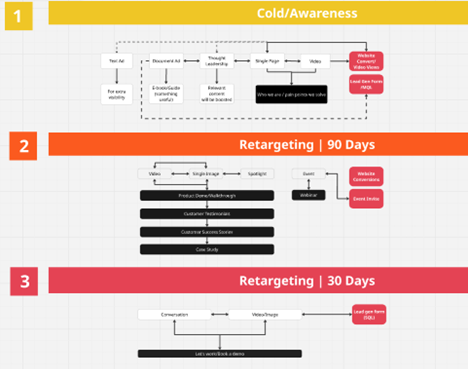
Retargeting is where LinkedIn Ads stop being a high cost awareness channel and start behaving like a performance engine. Unlike cold targeting, retargeting allows you to re-engage people who have already shown some level of interest: by visiting your website, engaging with an ad, opening a document, or submitting a Lead Gen Form. Because these audiences are warmer and more familiar with your brand, campaigns tend to see higher engagement rates, better lead quality, and more efficient cost per result.
LinkedIn lets you use the
Insight Tag on your website to track visitors and build retargeting segments based on the pages they visit. Once someone visits your site and is matched via the Insight Tag, you can retarget them on LinkedIn with ads that reflect their behavior. This is critical for continuing to nurture audiences who have already shown interest in your brand.
If you want to see a full view of how Strategy Kiln does retargeting on LinkedIn, you’ll find our exact process in this Miro visualization >.
Predictive audiences and when to test them
You may have heard of and even used LinkedIn’s “Lookalike audience” feature. LinkedIn retired that feature in February of 2024, replacing it with Predictive audiences.
Predictive Audiences are a type of Matched Audience that use a combination of AI and first-party data to predict which LinkedIn members are likely to behave similarly to your high-value source audiences. They take about 48 hours to generate.
Rather than simply matching similar profiles based on past traits, predictive audiences analyze patterns from data sources such as Lead Gen Forms, uploaded contact or company lists, conversions captured by the Insight Tag, or retargeting audiences. LinkedIn then builds a dynamic custom audience that continuously updates and scales your reach to members likely to perform desired actions.
When to test Predictive Audiences:
- After you’ve built a strong seed list, because predictive audiences require at least 300 members in your source data to be created.
- When you want to scale beyond your matched contacts without manually expanding interest or demographic filters.
- When campaign performance needs improvement in conversion or lead quality; predictive models can help focus on high-intent prospects.
- As an alternative to Lookalike audiences. If you previously relied on lookalikes for prospecting, predictive audiences are now LinkedIn’s recommended way to grow your target reach.
By combining Predictive Audiences with strong core targeting and Matched Audiences, you can maintain precision while still exploring new, relevant prospects who are likely to convert.
Common targeting mistakes that waste budget
One of the biggest complaints that we hear from our clients before they start working with us is that the time, effort, and most importantly, money they have spent on LinkedIn ads targeting has been a waste. It pains us to hear this because we know that it may very well be true if they have been making some common targeting mistakes that bleed an advertising budget dry.
Finding the right balance: not too small, not too broad
One of the biggest complaints that we hear from our clients before they start working with us is that the time, effort, and most importantly, money they have spent on LinkedIn ads targeting has been a waste. It pains us to hear this because we know that it may very well be true if they have been making some common targeting mistakes that bleed an advertising budget dry.
When advertisers create overly narrow audiences, it’s often driven by the belief that concentrating spend on a tiny, hyper-specific group will produce better results. Unfortunately, that approach can backfire. If your audience is too small, LinkedIn doesn’t have enough people to deliver ads efficiently, which can limit reach, inflate costs, and ultimately restrict lead volume. We call this phenomenon “oversegmentation.”
On the flip side, audiences that are too broad introduce a different set of problems. Casting too wide a net means your ads are more likely to reach people who aren’t a good fit for your offer. That leads to wasted budget, lower engagement, and muddy performance data that makes optimization harder over time.
For most of our clients, the “sweet spot” for target audience size is 60,000 or less. The goal is balance: you want an audience that’s focused enough to align with your Ideal Customer Profile, but large enough to allow LinkedIn’s delivery system to work effectively.
This is where exclusions become just as important, if not more important, than inclusions.
Exclusions
Yes, we are going over this again – it is that important!
You should select the job functions, seniority levels, and other attributes you want to target. But it is equally important to exclude people you don’t want to reach. People like sales reps, interns, and students often slip into campaigns even when they’re not part of your buying audience. Left unchecked, they can quietly drain your budget.
Exclusions act as “hard” filters in LinkedIn Ads. While inclusion targeting can still allow some irrelevant users through, exclusions actively prevent your ads from showing to people who you know for sure don’t meet your criteria. This improves efficiency, and ensures your message reaches the most qualified prospects, leading to higher conversion rates and stronger ROI.
In short, effective targeting isn’t just about who you let in. It’s about who you intentionally keep out.
Layering too many filters
Most often, layering too many filters in your LinkedIn Ads campaign will lead to an audience that is too small. You don’t want to get so specific in your targeting that you miss the point of why you are advertising – to create demand, learn what resonates, and allow LinkedIn’s delivery system enough room to find the right people to present your ads to.
Over-constraining your audience may feel like precision at work, but it often limits performance, increases costs, and prevents campaigns from scaling.
Optimizing too early
Many people also make the mistake of optimizing their campaigns too early, making changes to audience parameters after just a few days’ worth of results. The more nurturing of your audience you do, the better; decision-making takes time in B2B marketing.
In our eBook,
Raising All Ships with LinkedIn Ads, we provide a close look at exactly how long you should be running a LinkedIn Ads campaign to build trust with your audience before you start making changes to increase intent, demand, and ultimately, engagement. The eBook explains why nurturing takes so long, and why it is ultimately worth it.
Quick checklist for LinkedIn Ads targeting
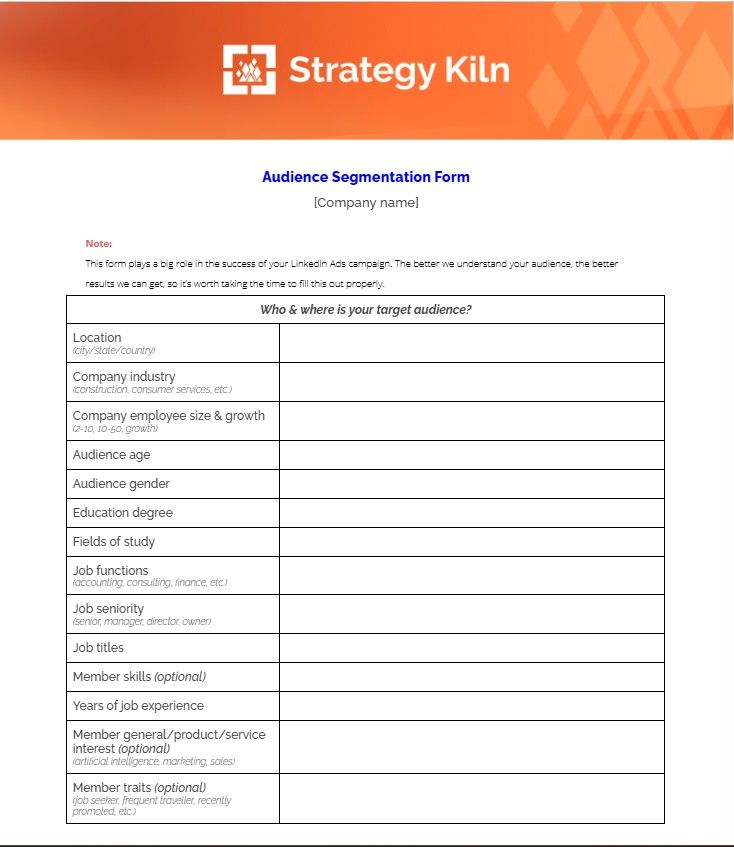
We’ve laid just about all our secrets bare here for you to build and refine a LinkedIn ads targeting strategy that will yield results for your business, but we have one more thing to give you: the Strategy Kiln Audience Segmentation Form.
This form is what we send to our clients before we start building a LinkedIn Ads targeting campaign for them. It asks for details about their target audience and acts as a quick checklist to make sure they know exactly who they are looking for before we get to work. We invite you to use it too!
Bringing it all together: a smarter approach to LinkedIn Ads targeting
LinkedIn Ads targeting doesn’t have to be overwhelming, but it does require intention. The most effective B2B campaigns are built by clearly defining who you want to reach, deliberately excluding who you don’t, and resisting the urge to overcomplicate the process.
Whether you’re targeting by company attributes, job function and seniority, or leveraging Matched Audiences, the goal is always the same: create enough focus for relevance while leaving enough room for LinkedIn’s delivery system to work. When you approach targeting as a structured, repeatable process, you give your campaigns the best possible chance to perform.
Get the fundamentals right, stay disciplined with exclusions, and allow time for your audience to nurture. That’s how LinkedIn Ads targeting turns from a budget drain into a reliable B2B growth channel.
For SaaS teams, targeting is one part of the broader program. Our guide to LinkedIn Ads for SaaS connects audience choices with budget planning, full-funnel campaigns, and qualified pipeline measurement.
If you want a second set of eyes
If you want help pressure-testing your LinkedIn Ads targeting before you start spending money on your campaign,
reach out to us. If you are on the right track, we’ll tell you so, and cheer you on as you kick off your campaign. If you need some extra help, we’d be happy to provide it.

Adam Fischer is a marketer with 10+ years of experience in brand management and digital marketing. He’s challenged conventional assumptions and taken bold moves to drive growth for small businesses like Dogeared Jewelry to multi-billion-dollar companies like CVS Health and Nature Made Vitamins. He leverages his B.S. in Philosophy from Northeastern University to ask questions that get to the heart of business issues, while his MBA in Marketing from the Thunderbird School of Global Management at ASU translates management philosophy into real strategic growth.

Insights to fuel your marketing business
Sign up to get industry insights, trends, and more in your inbox.
Contact Us
We will get back to you as soon as possible.
Please try again later.
Latest Posts